Create. Provide liquidity. Manage responsibly.
A practical guide to using Soltan.fun on Solana: create a token, create a Raydium CPMM pool, add or remove liquidity, understand LP tokens and assess on-chain signals without mistaking them for guarantees.
Before you begin
Soltan.fun provides tools that prepare user-requested actions on Solana. Connect a compatible Solana wallet and approve each transaction yourself. Soltan will never ask for your recovery phrase or private key.
Create your Solana token
Open Launch → Create Token and connect the wallet you want to use.
- Enter the token details. Choose an accurate name, symbol, description and optional project links. Do not impersonate another project.
- Review supply and decimals. The current launcher offers its configured supply/decimal options. Check them carefully; do not assume token parameters can be changed later.
- Add your logo and metadata. Use an image you have the right to publish. Wallets and explorers may take time to index metadata, and display is not guaranteed.
- Check the fee. The current launcher displays a Soltan token-creation platform fee of 0.02 SOL. Network, priority and account costs may be additional.
- Inspect the wallet prompt. Confirm the domain, account, requested action, amount and transaction details. Reject anything unexpected.
- Sign and wait for confirmation. Save the full token mint address and use it to identify the exact token elsewhere.
Phantom warnings: what to do
New or unreviewed website warnings
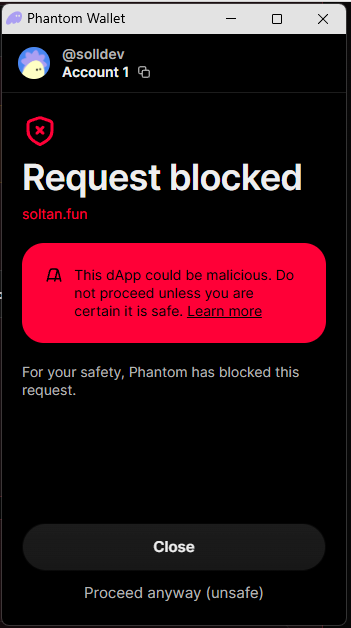
Phantom may show a domain warning when a website is new or has not yet been reviewed. A new website is one possible explanation, but the warning alone does not prove why it appeared. Transaction-specific or malicious-dApp warnings are different and must be taken seriously.
The example image is illustrative. Exact warning wording and wallet behaviour can change.
Never share a seed phrase or private key, install unknown software, or approve a transaction merely because a website says it is safe.
Create a Raydium CPMM pool
A token does not automatically have a trading market. A liquidity pool pairs your token with another asset, such as SOL, so swaps may be possible. Open Create Pool.
- Enter the exact token mint. Use the full mint address from token creation, not a pool address or symbol.
- Check the token amount. The current pool form displays its configured token amount. Confirm the amount and ensure the connected wallet holds the required tokens.
- Enter the SOL side. The initial token/SOL ratio establishes the starting pool ratio and implied starting price. It does not establish fair value or guarantee future demand.
- Review costs. The current Soltan pool-creation platform fee is 0.01 SOL. Raydium/program, account, network and priority costs may be additional.
- Review and sign. Confirm the mint, amounts, fee and wallet transaction. Stop if the prompt differs from your intended action.
- Save the pool address. Once confirmed, verify that the pool corresponds to the correct token.
Add liquidity
Adding liquidity deposits assets into an existing pool. Depending on the pool and interface, you may need to provide both assets in the current pool ratio.
- Open Add Liquidity and connect the wallet that holds the assets.
- Select the exact supported pool and verify its full address and token mints.
- Enter the amount and review the corresponding amount of the other asset, estimated LP tokens and any slippage information shown.
- Check the estimated network and third-party costs. Keep enough SOL for fees.
- Review the full wallet prompt and sign only if it matches the action you initiated.
- After confirmation, check your LP balance and position in My Pools or My Assets.
Adding liquidity is not the same as buying only the project token. Your deposited assets remain exposed to pool-price changes and liquidity risks.
What are LP tokens?
LP tokens represent a proportional claim on liquidity in a pool. They are different from the project's ordinary token. The amount of LP tokens and the pool's current state influence what can be withdrawn; fees, price changes and slippage may affect the value returned.
LP tokens may appear as a separate token balance in your wallet. Do not send them to an unknown address or burn them unless you understand the consequences.
Manage or remove liquidity
Open My Pools to review supported pool positions for your connected wallet.
The current Soltan liquidity-removal platform fee is 0.04 SOL, plus applicable network and third-party costs. Always trust the fee displayed by the feature immediately before signing if the configuration changes.
LP burn: what it means
Burning LP tokens permanently destroys the LP tokens sent to the burn mechanism. It is commonly used to make the corresponding liquidity claim inaccessible. It is not the same as withdrawing liquidity, and it does not automatically burn the project's ordinary token.
Locking, burning and transferring LP tokens are different. Describe only what the on-chain evidence actually proves. If you use an external burn service, verify its domain and the exact mint before signing.
Open Sol Incinerator ↗Read LP information in Soltan Explorer
Open the token in Soltan Explorer and review the LP/security panel. Depending on the data available and successfully indexed, it may show pool/LP identifiers and detected burn or lock information.
For a broader review, check mint/freeze authorities and Token-2022 extensions where relevant, holder concentration, pool depth, contract/program behaviour, project claims and independent sources. Risk remains even after these checks.
Trading and crypto safety
Crypto-assets are volatile and speculative. You can lose all the value you put in. This guide is educational only and is not investment, financial, tax or legal advice.
Fees, terms and important information
Network fees, priority fees, account/rent costs and third-party charges are separate and can vary. Review the amount displayed by the live feature before approving a transaction.
Read the General Terms, Risk Disclaimer and Privacy Policy. They explain platform use, third-party dependencies, user responsibilities, limitations, privacy and risks. No website wording can guarantee immunity from claims or replace advice from a qualified lawyer familiar with Soltan's actual business and jurisdictions.
Soltan.fun is part of Soltan Web Development. Questions or security reports: soltan.info@soltan.fun.
Final safety checklist
Blockchain data can be incomplete or delayed. No LP burn, lock, wallet label, score or guide guarantees a token's safety or future value. Need help? soltan.info@soltan.fun.